
Turn Every Email Into the Right TMS Action
Connect your Gmail or Outlook mailbox and AI Inbox reads every shipment email, routes it to the right AI agent, and automatically creates quotes, updates loads, sends tracking, or flags items that need human review.




Trusted by modern freight operators


Results / Proof Bar
Full inbox visibility. Agents on every email. Nothing missed.
Built for freight teams that run on email and need the TMS to stay in sync automatically.
5-step workflow
From Incoming Email to Completed TMS Action
Every email is captured, classified, and routed to the right agent. The agent acts on the TMS, drafts a reply, or creates a task, with a full audit trail visible in the inbox interface.
Email Capture
AI captures emails from a connected Gmail or Outlook mailbox, including threads and attachments, and queues them for the right agent automatically.
Gmail · Outlook · Threads · Attachments
How Inbox Drives Operations
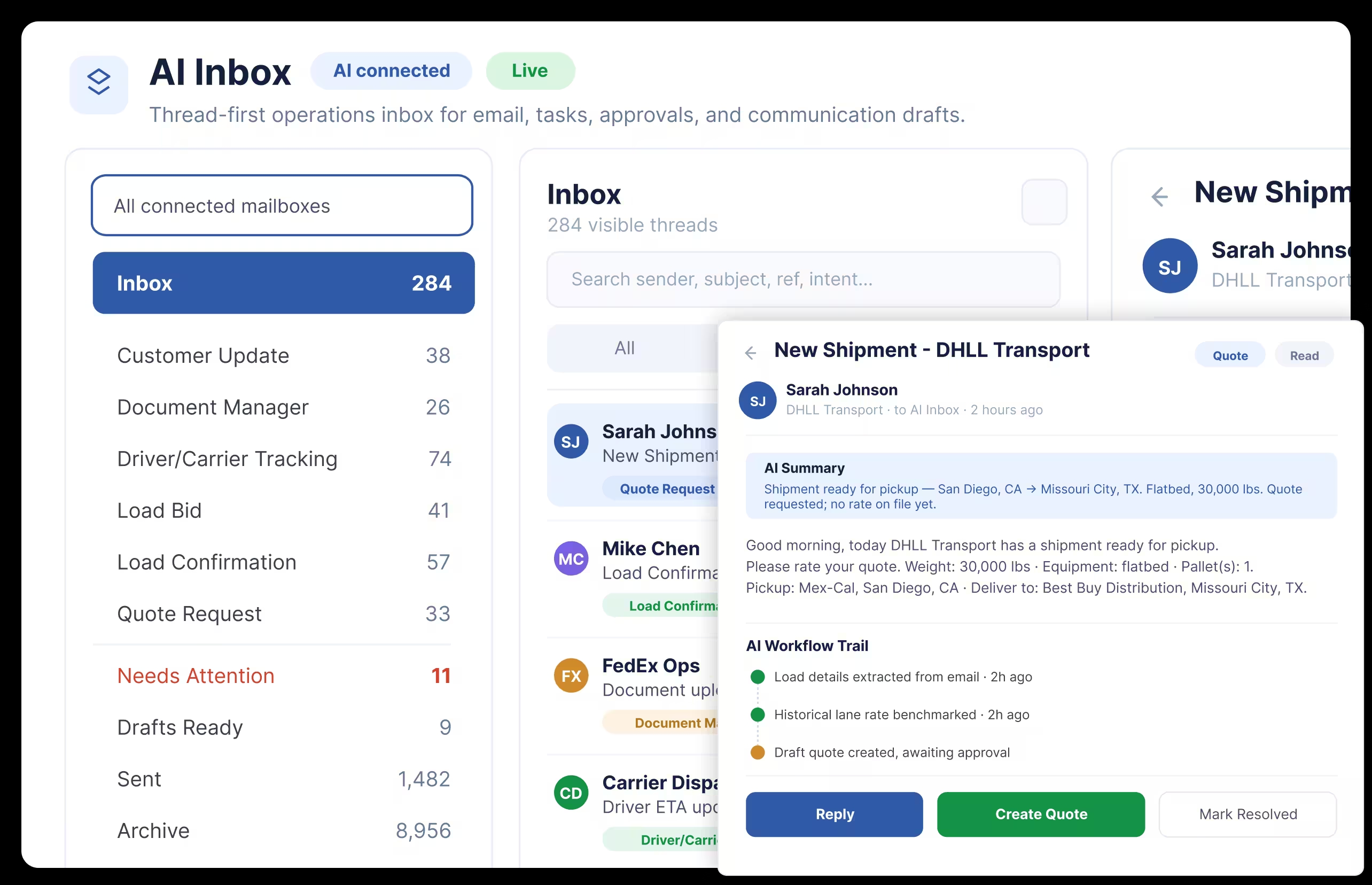
Every Inbound Email Triggers a Load Action, Quote Response, or TMS Update
Your team does not read emails and decide what to do next. The agent reads the email, identifies what is being asked, and executes the right action inside the TMS across tracking, quoting, and documentation.
Inbox and thread management
One Interface for Every Thread and Every Agent Action
AI Inbox gives your team a centralized view of every email thread alongside what the agent did. Search contacts, reply directly, attach files, and review agent output without switching between your email client and the TMS.
- ✓View every thread and agent action in a single interface
- ✓Search system contacts and reply from within the inbox
- ✓See exactly what each agent processed, drafted, or flagged
5 threads · 4 agent actions · 1 Needs Review
Tracking update request - Load #45821
GlobalGoods Inc · CHI → ATL
Rate request - CHI to ATL
FreightBridge Co · DAL → MIA
Load confirmation attached
MidWest Cargo · PO #8821
POD request for delivery confirmation
Pacific Shippers · NYC → CHI
Driver status update
SunState Freight · LAX → SEA
Tracking Agent
Load #45821 · CHI → ATL · 3m ago
Bidding Agent
Rate request parsed · 8m ago
Documentation Agent
Load confirmation · 12m ago
Status Agent
Delivery confirmation · 18m ago
Agent workflows
Dedicated Agents for Tracking, Bidding, Status, and Documentation
Each email workflow runs through its own agent. A tracking request goes to the tracking agent. A rate request goes to the bidding agent. A load confirmation routes through AI Documentation. Each agent handles its queue independently so no email type delays another.
- ✓Tracking agent replies with current load position and ETA pulled from the TMS
- ✓Bidding agent reads rate requests, extracts lane and equipment data, and drafts quotes
- ✓Status agent pulls load milestones and responds to delivery confirmation requests
The primary differentiator
Learns Every Customer and Gets More Accurate Over Time
AI Inbox builds a context layer per customer, carrier, and load. It tracks communication patterns, document preferences, and account behavior with every email it processes. Agents use that context to produce more precise replies and actions the longer the system runs. That same context feeds directly into TMS Copilot.
- ✓Per-customer memory for communication patterns and workflow preferences
- ✓Per-load context across documentation, status, and billing interactions
- ✓Context feeds into TMS Copilot for a unified view of every account
Customer
Per-customer memory
Load
Per-load context
Copilot
TMS Copilot feed
Per-customer memory
Communication patterns and workflow preferences
Per-load context
Documentation, status, and billing interactions
TMS Copilot feed
Unified view of every account
Why email volume creates delays
The High Cost of Inbox Overload in Freight Operations
Quote requests, carrier replies, and load confirmations sit in inboxes before anything moves in the TMS. Every email that waits is a load that does not move.
Tracking requests get replies from the TMS without dispatcher involvement
Rate request emails are read, extracted, and drafted for response automatically
Load confirmations are processed and pushed to EDI or queued for approval
Tasks are created the moment an agent cannot resolve a request
Customer context builds with every email, improving every future response
AI Inbox agent layer · active on every email
Email classification
Tracking request detected · high confidence
Agent routing
Tracking Agent · Load #45821 · CHI to ATL
TMS data pull
Current position and ETA from load record
Draft reply
Status update ready for one-click approval
Audit trail
Thread action logged · Needs Review
Agent status: draft ready for review
Tracking reply drafted in 8 seconds · Needs Review
NEEDS REVIEW ✓
Operating modes
Deploy at the Right Pace for Your Team
Every agent can run in Dry Run or Live Mode. Configure them independently so you validate before you execute.
Dry Run
Validate Before You Go Live
Agents classify emails and identify intent but take no action in the TMS. Use during onboarding to verify the system is reading your emails correctly before switching to Live Mode. Recommended for all new agent configurations.
Live Mode
Agents Act on Every Email
Agents execute their full workflow. Replies send, tasks create, documents process. Run some agents live and keep others in Dry Run at the same time. Configured per agent, per inbox.
Customer Stories
Video Testimonials
Hear from transportation professionals who transformed their operations with LoadStop.
Connect the Tools You Already Use
Work alongside your existing freight technology stack, from load boards, ELDs, accounting, factoring, and more. No rip-and-replace required.

KeepTruckin / Motive
Motive (formerly KeepTruckin) integrates with LoadStop TMS for real-time ELD compliance, GPS tracking, and automated HOS management across your fleet.

Samsara
Samsara's ELD and fleet management platform connects with LoadStop TMS for live GPS visibility, driver safety scores, and seamless compliance reporting.

Geotab
Geotab integration provides LoadStop TMS with vehicle telematics data, route analytics, and HOS logs for smarter, data-driven fleet management.

TrackEnsure
TrackEnsure ELD integrates with LoadStop TMS to automate FMCSA compliance, driver log management, and real-time asset tracking for your fleet.

Orbcomm
Orbcomm's telematics platform connects with LoadStop TMS for HOS compliance, trailer tracking, and end-to-end supply chain visibility.

Elog 360
Elog 360 ELD integration with LoadStop TMS ensures driver compliance, automated log creation, and real-time fleet location tracking.

TruckX
TruckX ELD connects with LoadStop TMS to simplify electronic logging, reduce violations, and improve driver accountability across your fleet.

Omnitracs
Omnitracs integration brings advanced fleet intelligence, driver behavior monitoring, and predictive analytics directly into the LoadStop TMS platform.

TT ELD
TT ELD integrates with LoadStop TMS to provide affordable, FMCSA-compliant electronic logging and real-time GPS tracking for carriers of all sizes.

Beyond GPS
Beyond GPS ELD connects with LoadStop TMS to deliver accurate location data, HOS tracking, and driver log management in one unified workflow.

Verizon Connect
Verizon Connect's fleet management platform integrates with LoadStop TMS for vehicle tracking, route optimization, and driver performance insights.

Fleet Hunt
Fleet Hunt ELD integration with LoadStop TMS streamlines compliance management, driver scheduling, and GPS tracking for small and mid-size carriers.

Alfa ELD
Alfa ELD integrates with LoadStop TMS to keep drivers FMCSA-compliant with automated log entries and real-time location updates.

BigRoad
BigRoad ELD integration simplifies HOS logging, DVIR management, and DOT compliance tracking directly inside LoadStop TMS.

VisTracks
VisTracks ELD connects with LoadStop TMS to provide reliable electronic logging, GPS tracking, and compliance tools for owner-operators and fleets.

Coretex
Coretex fleet management integrates with LoadStop TMS to deliver telematics data, safety monitoring, and real-time vehicle location.

Isaac ELD
Isaac ELD integrates with LoadStop TMS to provide Canadian and US compliance tools, driver coaching, and live fleet visibility.

Vlog ELD
Vlog ELD integration with LoadStop TMS automates driver log creation, HOS tracking, and FMCSA compliance reporting with minimal driver effort.

Ada ELD
Ada ELD connects with LoadStop TMS to streamline electronic logging, vehicle inspection reports, and real-time fleet tracking.

Sparkle ELD
Sparkle ELD integration with LoadStop TMS delivers simple, reliable HOS compliance and GPS tracking designed for independent carriers.

MyDriverBook
MyDriverBook integrates with LoadStop TMS to give drivers a simple mobile logbook while providing dispatchers with real-time HOS visibility.

Forward Thinking
Forward Thinking ELD integration with LoadStop TMS provides fleet-wide compliance monitoring, driver alerts, and automated log management.

JJ Keller
J.J. Keller ELD integrates with LoadStop TMS to combine DOT compliance expertise with real-time GPS tracking and driver log management.

Regulog ELD
Regulog ELD integrates with LoadStop TMS for real-time ELD compliance, GPS visibility, and automated HOS management across your fleet.

Spireon
Spireon's trailer tracking platform integrates with LoadStop TMS to provide real-time asset location, utilization metrics, and detention alerts.

FleetSharp
FleetSharp integrates with LoadStop TMS to deliver GPS-based trailer tracking, geofencing alerts, and idle time reporting for your asset pool.

Anytrek
Anytrek asset tracking connects with LoadStop TMS to provide real-time trailer location, temperature monitoring, and cargo security alerts.
Verizon (Assets)
Verizon Connect asset tracking integrates with LoadStop TMS for real-time trailer visibility, utilization reporting, and yard management capabilities.

SkyBitz
SkyBitz trailer tracking integrates with LoadStop TMS to reduce empty miles, eliminate lost trailers, and improve asset utilization across your fleet.
Orbcomm (Assets)
Orbcomm asset tracking integration with LoadStop TMS provides end-to-end trailer visibility, temperature monitoring, and geofence-based exception alerts.

Thermo King
Thermo King's refrigerated transport data integrates with LoadStop TMS to provide reefer temperature monitoring and automated pre-trip inspection logs.

RoadReady
RoadReady trailer management integrates with LoadStop TMS to help carriers track trailer location, automate yard checks, and reduce asset loss.

TGI
TGI trailer tracking integration with LoadStop TMS delivers GPS visibility, geofencing, and asset utilization reports for full-fleet management.

DAT
DAT Freight & Analytics integration gives LoadStop brokers and carriers direct access to the largest load board network for real-time capacity matching.

Truckstop
Truckstop.com integration lets brokers post loads and search available trucks in real time directly from the LoadStop dispatch board.

C.H. Robinson
C.H. Robinson's digital freight platform integrates with LoadStop TMS to expand capacity access and streamline carrier sourcing for brokers.

Loadsmart
Loadsmart's digital freight marketplace integrates with LoadStop TMS to provide instant rate quotes, automated booking, and real-time load tracking.

Uber Freight
Uber Freight integration with LoadStop TMS connects brokers and shippers to a large carrier network with transparent pricing and instant booking.

RTS Financial
RTS Financial factoring integration allows LoadStop carriers to submit invoices for same-day funding directly from the TMS with zero manual re-entry.

First Line Funding Group
First Line Funding Group integrates with LoadStop TMS to provide carriers with fast invoice factoring, fuel advances, and seamless cash flow management.

Compass Funding
Compass Funding integrates with LoadStop TMS to give carriers instant access to freight invoice factoring and working capital solutions.

Baron Finance
Baron Finance factoring integration with LoadStop TMS enables automated invoice submission and fast funding for owner-operators and small fleets.

Revolution Capital
Revolution Capital connects with LoadStop TMS to accelerate carrier cash flow through fast invoice factoring and transparent fee structures.

Flat Rate Funding
Flat Rate Funding integration with LoadStop TMS provides carriers with simple, predictable invoice factoring and same-day payment processing.

OTR Capital
OTR Capital factoring integration enables LoadStop carriers to submit invoices instantly, access fuel advances, and monitor funding status in real time.

TAFS
TAFS (Transport Alliance Factoring) integrates with LoadStop TMS to deliver fast invoice funding, fuel card solutions, and back-office support for carriers.

Apex Capital
Apex Capital Corp integration gives LoadStop carriers instant access to freight factoring, fuel advances, and comprehensive account management tools.

Love's Financial
Love's Financial integration with LoadStop TMS connects carriers to factoring services and fuel card solutions through the trusted Love's network.

eCapital
eCapital integration with LoadStop TMS provides carriers and small fleets with same-day factoring, fuel advances, and streamlined back-office tools.

WEX
WEX factoring and payments integration with LoadStop TMS streamlines invoice settlement, fuel card management, and carrier payment workflows.

Farwest Capital
Farwest Capital factoring integration with LoadStop TMS accelerates carrier cash flow with competitive rates and fast invoice funding.

PCG
PCG factoring integration with LoadStop TMS gives carriers flexible invoice funding options and real-time account management from within the platform.

TAB Bank
TAB Bank integration with LoadStop TMS provides carriers with freight factoring, working capital lines, and asset-based lending solutions.

Express Freight Finance
Express Freight Finance integrates with LoadStop TMS to deliver fast, reliable invoice factoring and cash flow management for trucking companies.

QuickBooks Online
Sync invoices, payments, and expense data between LoadStop TMS and QuickBooks Online for a fully automated accounting workflow.

QuickBooks Desktop
LoadStop's QuickBooks Desktop integration keeps your on-premise accounting in sync with freight invoices, driver pay, and expense records.

NetSuite
Bi-directional sync with NetSuite ERP gives finance teams complete visibility into freight revenue, costs, and driver payroll from LoadStop.

Microsoft Dynamics GP
Microsoft Dynamics GP integration connects LoadStop TMS financials with your ERP for automated journal entries, invoicing, and financial reporting.

Google Mileage
Google Mileage integration with LoadStop TMS provides accurate driving distance calculations for load planning, rate estimation, and IFTA reporting.

Trimble / PC Miler
Trimble PC Miler integration delivers industry-standard routing and mileage data inside LoadStop TMS for precise freight rating and compliance.

Trimble Fuel Optimization
Trimble fuel optimization integrates with LoadStop TMS to calculate cost-effective fueling stops, reduce fuel spend, and improve fleet-wide profitability.

EFS Fuel Card
EFS Fuel Card integration with LoadStop TMS enables automated fuel card management, transaction reporting, and real-time spending controls for drivers.

Comdata
Comdata integration connects fuel card transactions directly to LoadStop TMS for real-time fuel cost tracking, driver advances, and fleet settlement.

TCS Fuel Card
TCS Fuel Card integration with LoadStop TMS provides carriers with nationwide fuel discounts, real-time transaction tracking, and automated reconciliation.

Pilot Flying J
Pilot Flying J fuel card integration with LoadStop TMS delivers fuel discount management, transaction tracking, and driver advance capabilities at scale.

QuickQ
QuickQ fuel card integrates with LoadStop TMS to give carriers fuel discount access, spending controls, and automated transaction reconciliation.

BVD Fuel Card
BVD fuel card integration with LoadStop TMS simplifies driver fuel advances, transaction monitoring, and fleet fuel cost reporting.
Motive Fuel Card
Motive Fuel Card integration with LoadStop TMS connects fuel spending directly to dispatch, enabling automated driver pay and real-time cost tracking.

Relay Fuel Card
Relay fuel integration with LoadStop TMS automates driver fuel advances, spending limits, and card controls directly from the dispatch dashboard.

BTF
BTF (Breakthrough Fuel) integration with LoadStop TMS connects fuel program data for fuel cost tracking, reimbursement visibility, and automated fleet settlement.

PrePass
PrePass integration with LoadStop TMS automates weigh station bypass, toll payments, and CSA compliance data for a smoother, faster driver experience.

Bestpass
Bestpass toll management integration with LoadStop TMS consolidates nationwide toll bills, automates payment processing, and reduces driver delays.

FourKites
FourKites real-time freight visibility integrates with LoadStop TMS to give shippers and brokers predictive ETAs and shipment tracking at scale.

Descartes MacroPoint
Descartes MacroPoint carrier-side visibility integrates with LoadStop TMS for automated load tracking, check calls, and exception management.
MacroPoint Brokerage
Descartes MacroPoint Brokerage integration with LoadStop TMS provides brokers with automated shipment tracking and real-time carrier location updates.

FarEye
FarEye visibility platform integrates with LoadStop TMS to provide dynamic routing, real-time tracking, and predictive delivery intelligence.

Project44 (P44)
Project44 integrates with LoadStop TMS to deliver advanced multi-modal visibility, carrier tracking, and real-time supply chain data at enterprise scale.

MyCarrierPortal
MyCarrierPortal integration with LoadStop TMS automates carrier qualification, insurance verification, and onboarding workflows for freight brokers.

RMIS
RMIS (Registry Monitoring Insurance Services) integrates with LoadStop TMS to automate carrier insurance monitoring, compliance checks, and renewal alerts.

Highway
Highway carrier safety platform integrates with LoadStop TMS to detect fraud, verify carrier credentials, and automate compliance for broker operations.

TriumphPay
TriumphPay integrates with LoadStop TMS to accelerate carrier payment cycles, streamline broker settlement, and reduce days-to-pay for carriers.

Denim
Denim's freight payment platform integrates with LoadStop TMS to automate broker-to-carrier payments, factoring, and cash flow management.

Triumph Business Capital
Triumph Business Capital integration with LoadStop TMS streamlines carrier payment workflows, quick-pay options, and real-time funding status.

Epay Manager
Epay Manager integrates with LoadStop TMS to automate carrier invoicing, document collection, dispute resolution, and ACH carrier payments from your back office.
Relay (Lumper)
Relay Lumper payment integration with LoadStop TMS enables brokers to authorize and pay lumper services digitally, eliminating cash handling on the dock.

Tenstreet
Tenstreet driver recruiting and onboarding platform integrates with LoadStop TMS to streamline driver applications, qualification, and digital document management.

Fullbay
Fullbay commercial vehicle repair software integrates with LoadStop TMS to connect maintenance requests, repair orders, and fleet downtime data with dispatch.

Gmail
Gmail integration powers AI Inbox inside LoadStop TMS to auto-parse load tenders, draft replies, and send confirmations from your existing inbox without leaving the platform.

Microsoft Outlook
Outlook integration connects LoadStop TMS AI Inbox to your Microsoft 365 mailbox so dispatchers and carrier reps can auto-parse, reply to, and log freight emails without manual copy-paste.

Slack
Slack integration pushes LoadStop TMS dispatch alerts, AI Inbox replies, and load milestone updates into the channels your team already uses, keeping operations and sales in sync.

Telegram
Telegram integration sends AI-driven dispatch updates, driver confirmations, and load alerts to drivers and carrier partners on the channel they use most in cross-border freight.
Frequently Asked Questions
Questions About AI Inbox
Common questions from freight teams evaluating AI Inbox. Don't see what you need? Schedule a personalized demo.
What agent types does AI Inbox include?
AI Inbox includes five agent types: tracking, bidding, status updates, load confirmations, and POD handling. Each agent handles its own email queue independently. You can enable or disable individual agents via the Agent Workflows menu and configure each one to run in Dry Run or Live Mode.
What is the difference between Dry Run and Live Mode?
In Dry Run, agents classify emails and identify intent but take no action in the TMS. Use this during onboarding to verify the system is reading your emails correctly. In Live Mode, agents execute: replies send, tasks create, documents process. You can run some agents live and keep others in Dry Run at the same time.
How does Needs Review differ from Needs Action?
Needs Review means the agent completed the task and created a draft reply for your approval. You read it, edit if needed, and send with one click. Needs Action means the agent could not resolve the request. It creates a task in the TMS and flags the thread for your team.
How does AI Inbox connect to AI Documentation?
AI Inbox and AI Documentation are natively connected. When a load confirmation arrives by email, AI Documentation extracts the structured data while AI Inbox handles the communication, EDI push, or approval routing. The same connection applies to POD requests. Both steps are configurable per agent.
Can managers see all inboxes?
Yes. Managers have access to all connected inboxes and can grant specific inbox access to other team members. Individual users see their own inbox by default. All agent actions are visible in the thread view with a full audit trail, regardless of access level.
How does AI Inbox connect to Gmail or Outlook, and what happens to my email data?
AI Inbox connects to Gmail or Outlook through that provider's own sign-in process (OAuth); LoadStop never receives or stores your email password. Connected messages are read to classify intent and take the action your administrator configures. Full details on data handling, retention, and our AI vendors are in our Privacy Policy.

Your inbox is the busiest part of your TMS. Put AI to work on it.
Join carriers and brokers who use LoadStop to handle email volume without adding headcount. Book a personalized demo and see it in action.
No credit card required · Cancel anytime