

Triggered
TMS record
Dispatch-ready driver file
The full hiring lifecycle, posting to activation, in one file. Every document lands in the Driver Qualification File automatically, and every contract package configures by operations and division.




Trusted by modern freight operators


The Problem
Candidate tracking, scheduling, document storage, and TMS entry each live in a separate system. None of them share information with the others, so a missing document has nowhere to surface until an audit finds it.
Driver Onboarding
Process Loop
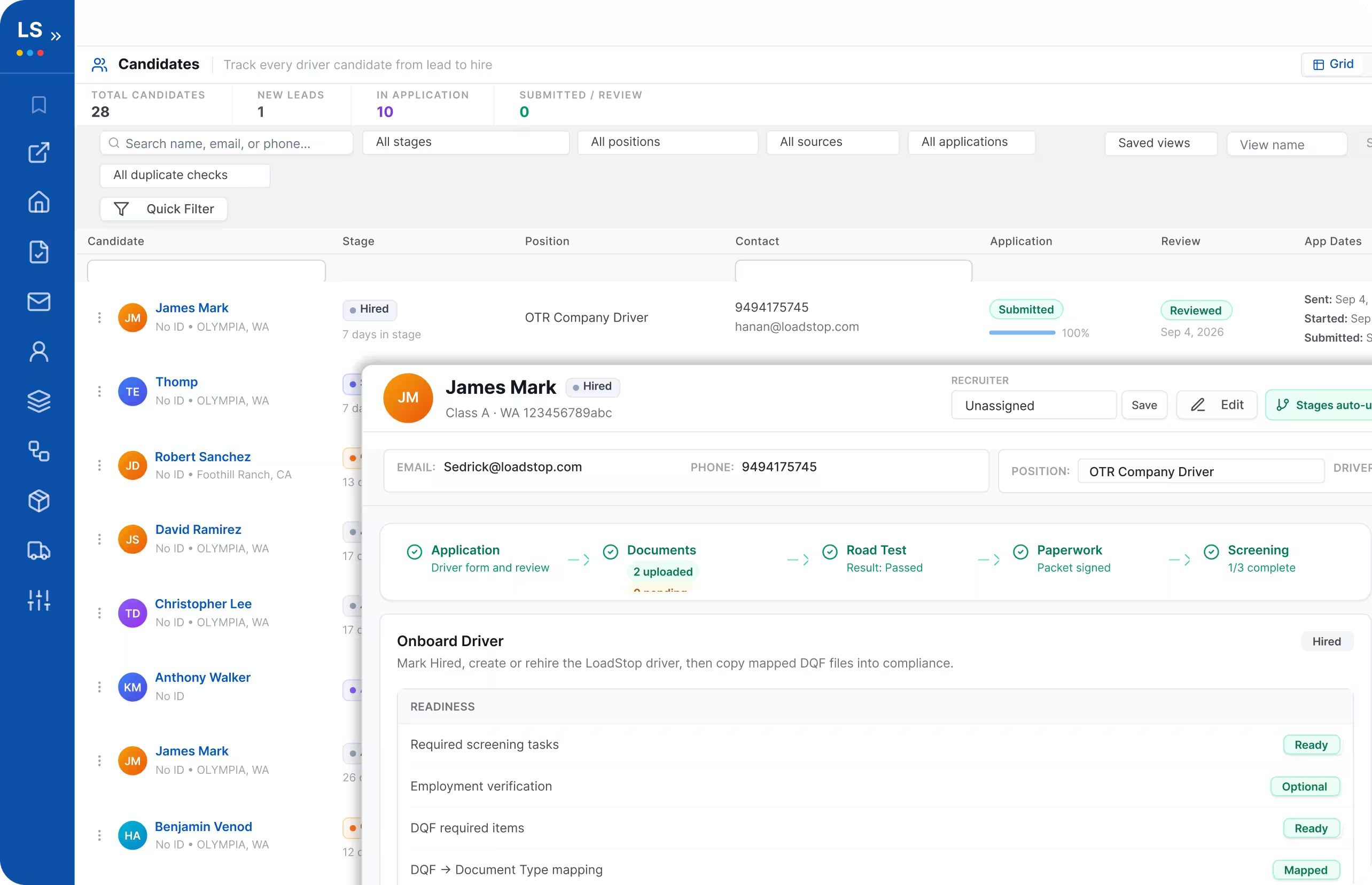
In focus: Onboard
 Application
Driver form and review
Documents2 uploaded · 0 pending
Road TestResult: Passed
PaperworkPacket signed
Screening1/3 complete
VerificationEmployment checks
DQFFinal qualification file
 Onboard
Driver #500334
The Full Hiring Lifecycle
Six stages, one file, the full hiring lifecycle from posting to activation. Nothing gets re-typed between them, and every document lands in the Driver Qualification File automatically.
Set pay, route, equipment, and the required document set once per position.

Set pay, route, equipment, and the required document set once per position.
Beyond the TMS Record
After you hire a driver, one click sets them up everywhere: their TMS record, their ELD, their Relay account, their fuel card. All at once.
TMS record
Dispatch-ready driver file
ELD profile
HOS rules and device pairing
Relay account
Messaging turned on
Fuel card
Card assigned to the unit
Driver activated
Available for dispatch
Distribution
Not every driver finds you the same way. The posting doesn't care which one gets them in the door, a QR code on a truck stop flyer, a text, a share on the job board, a direct link. However they get there, the application lands in the same pipeline.

A QR code on a bulletin board, a truck stop flyer, or a hiring event banner. Scan it, and the application opens tied to that exact position.

Share the link on Facebook, in a driver Facebook group, or on your careers page. However a driver sees it, they fill out the same application.

Text a link straight to a driver you know. Same posting, same pipeline. No separate referral portal.

 One Pipeline
For Enterprise · Contract Packaging by Division
Running multiple operations and divisions means different drivers need different paperwork, a specific hours-of-service form, an MVR certification for another, a separate signed package for a different division altogether. With Driver 360, build each package once, and it applies automatically from there.
 Terminal A
Dallas, TX
Required Documents
 Auto-applied from templateTerminal B
Los Angeles, CA
Required Documents
Auto-applied from templateTerminal CChicago, IL
Required Documents
Auto-applied from template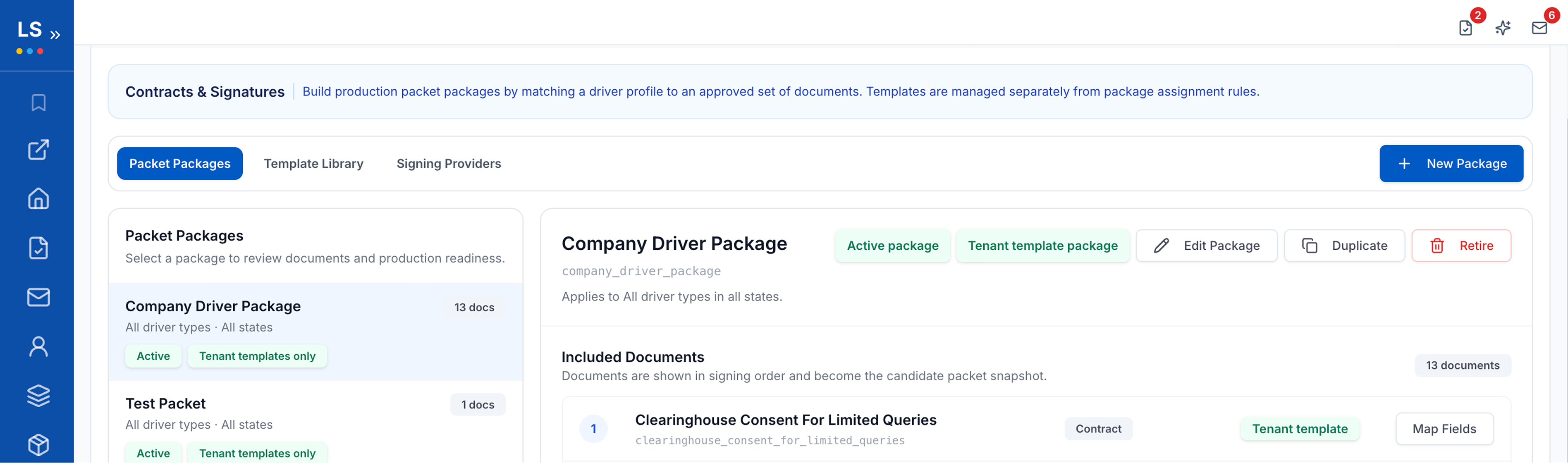
What's Built In
Contracts signed in-platform, no DocuSign bill, for most fleets. Enterprise teams with existing security or compliance standards they can't deviate from, can integrate DocuSign or HelloSign instead.
FMCSR Section 391.31, scored on a tablet. The certificate files itself into the Driver Qualification File the moment it ends.
Gaps and inconsistencies get flagged. A person reads the file and makes the call.
One platform running a different signed-document set for a Texas division than a California one, without switching tools.
Compliance & Audit Readiness
Every document lands in the Driver Qualification File. Clear a driver for activation, and you've already built your audit trail. Nothing to reconstruct after the fact.
James Reyes
OTR Driver - Class A CDL
6 / 8
docs complete

CDL - Class A
Expires 2026-09-14
Medical Certificate
DOT Physical on file
Drug Screen
Negative - on file
SSN Card
Verified
Road Test Certificate
FMCSR § 391.31
Driver Consent Form
Signed electronically
W-9
Not yet submitted

Safety sees the full file, one driver or the whole roster.


Every e-signature captures the signer's IP address and location. The document locks the instant it's signed, and any attempt to alter or corrupt it afterward is detectable.
 End-to-end encryptionRole-Based Access ControlTamper-Evident E-Signatures
The Impact

2x
Productivity Hiring Within Your TMS, Not a Bolted-On Tool

Up to 20%
Less Time Spent on Hiring Admin

Built to Fit
Hire Right the First Time
Honest Comparison
A lot of hiring platforms handle the application and the pipeline well too. That's table stakes. Here's the actual difference.
Other Hiring Tools
LoadStop Driver 360

Multiple logins, multiple invoices

One file, one vendor
Generic application templates
Complete customization by operations and division
Hired drivers retyped by hand
Synced into your LoadStop TMS in one click
Rehires slip through, past history lives in another tool
Checked automatically against your own LoadStop driver database
Every channel tracked separately, leads lost between them
QR code, text, email, or social, every application lands in one pipeline
Division paperwork rebuilt by hand for every terminal
Contract packages built once, applied automatically by division
Frequently Asked Questions
Need more detail? Visit our Help Center or talk with sales.
See how Driver 360 takes candidates from posting to activation in one file inside LoadStop.