

A few months ago, one of our customers asked us a question that ultimately changed our product roadmap. "Why should my team have to leave our TMS to hire and onboard a driver?" The question came from Gabriel Georgescu and the team at Just In Time Cargo Logistics.
Like many carriers, they had built their driver recruiting and onboarding process around multiple systems. Their recruiting team was working in Tenstreet. Their operations and driver records were in LoadStop. Documents were being collected during the hiring process, but once a driver was hired, the team still had to make sure the right information and paperwork made their way into the TMS. Two systems. Two sets of records. More manual work. And more opportunities for something to fall through the cracks.
Two systems, one workflow
Before: two disconnected systems bridged by manual re-entry. After: one record, one click.
Before
After
Driver 360
→ LoadStop TMS
one record, one clickBefore: a recruiting tool and the TMS, connected only by someone retyping data by hand. After: one candidate record flows straight into the TMS.
Gabriel's team had tried to adapt their existing onboarding platform around the way they wanted to operate, but they still weren't getting the workflow they needed. So Gabriel came to us with a challenge: Could LoadStop handle the entire driver journey inside the TMS, from candidate to road-ready driver?
Our first reaction was that this wasn't just an integration problem. It was a workflow problem. A carrier shouldn't have to recruit a driver in one system, manage compliance somewhere else, send paperwork through another platform, and then recreate that driver inside the TMS. What if it could all be one continuous process? That question is really about truck driver hiring itself. Why does hiring a driver run through completely different software than the one that dispatches, tracks, and pays him once he's on the road?
Why Truck Driver Hiring Still Runs Through Two Systems
Most carriers didn't choose to run driver hiring on one system and dispatch on another. It happened the way it happens everywhere: a recruiting tool got added first, the carrier TMS came later, and nobody ever went back to connect them. Job postings. Applications. DOT paperwork. All in one place. The driver himself, the one that TMS will eventually dispatch, track, and pay, lives in another.
That gap shows up in small ways until it shows up in a big one. A document a recruiter collected during hiring doesn't make it into the driver's file until someone remembers to move it. A candidate sits in under review for three weeks because nobody scheduled the road test. Someone who worked for the fleet two years ago reapplies, and nothing flags that he's not new. None of these are dramatic failures. They're small gaps that a DOT audit, or a driver's first bad week on the job, eventually finds.
Truck driver hiring ends up split across tools that were never built to talk to each other. The fix most carriers reach for is a better recruiting tool, not a different architecture.
The tools carriers reach for to patch the gap are familiar. A shared spreadsheet to track candidates. A calendar invite to schedule a road test. A shared drive for the paperwork in between. Each one solves a piece of the problem. None of them solve the handoff.
That conversation led our team to build something new. We call it Driver 360. The idea is simple: One candidate. One record. One workflow, from application to hire. But what we've built behind that idea goes much deeper.
What Driver 360 Actually Does
A recruiting team can manage candidates and applications. The driver can complete the DOT/FMCSA application and upload required documents. The system can help review applications and identify issues that need attention.
Safety and compliance teams can manage documents, screening, employment verification and DQF requirements. Road tests can be scheduled, scored, and documented. Hiring packets can be prepared and electronically signed without moving to another e-signature platform.
And when the candidate is ready to become a driver, the information and mapped documents can flow directly into LoadStop TMS Compliance. That's the whole path Gabriel asked about, from a job posting to a driver who is dispatch-ready, without a second system involved.
Recruiters, safety, and dispatch aren't all logging into different tools to get their piece done. They're all working the same driver record, from three different seats.
Four Workspaces, One Lifecycle
Driver 360 isn't one screen. It's four, built around the people who actually touch a hire. A recruiter works with Candidates: creating leads, sending application links, and running the day-to-day pipeline. Safety and compliance work inside that same candidate record: documents, screening, consents, and the qualification file. An examiner gets a narrower view built for one job: schedule a road test, score it, and certify or waive it. And the candidate has a public wizard of their own, built for a phone: apply, upload documents, and sign the final packet. Four workspaces, one underlying record. Nobody re-keys what someone else already entered.
Posting the Job in the First Place
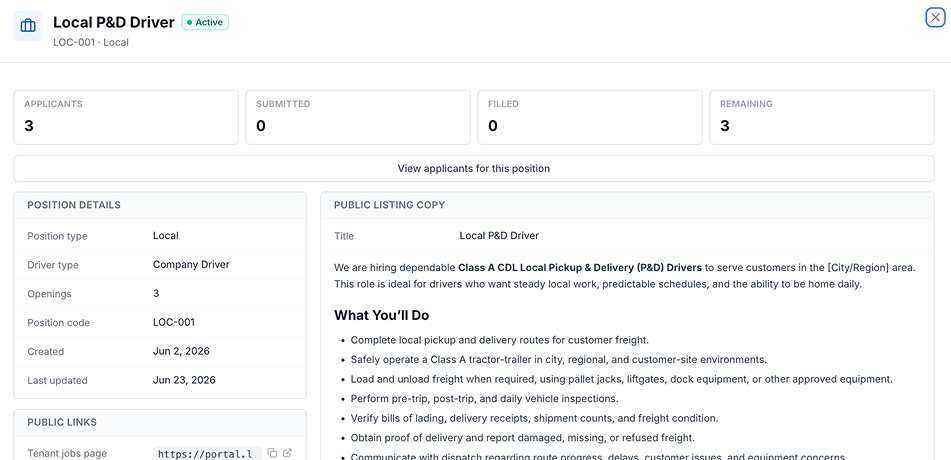
Every application starts with a posting, and that lives in Driver 360 too. A recruiter creates a position, writes the job description, sets the driver type, and publishes it. That one posting becomes a public link, a QR code, and an entry on the carrier's own branded job board, logo and accent color included. The driver type a candidate applies under decides which documents and packet apply later, so the paperwork is already scoped before anyone submits an application.
Inside the Recruiter's Hiring Inbox
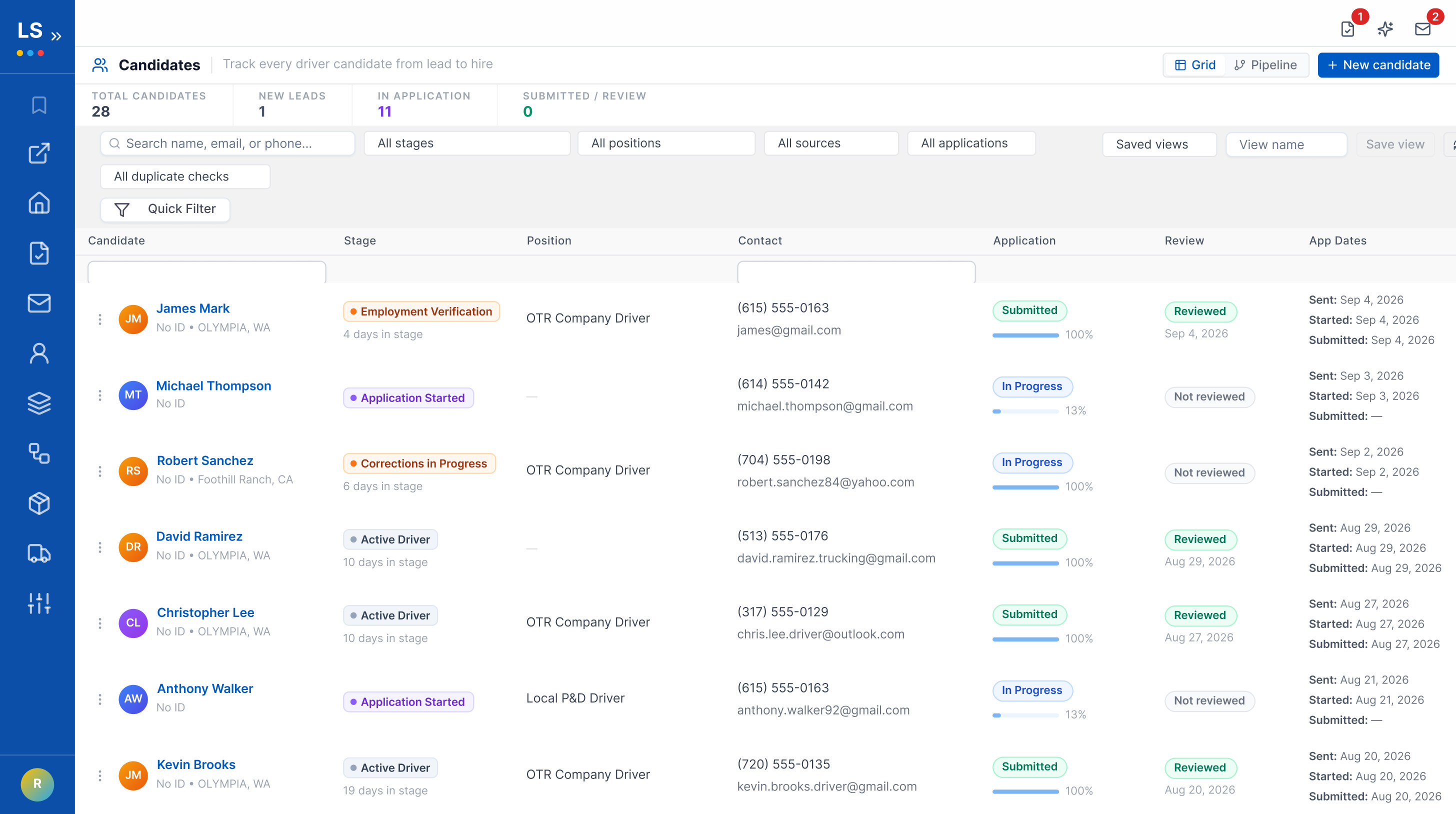
The Candidates workspace is built to work like an inbox, not a database export. A KPI strip up top shows total candidates, new leads, and how many are mid-application, so a recruiter can see where the day's work is. Search by name, email, phone. Filter by stage, position, source, or application status. Switch to a pipeline view and the same candidates line up as a kanban board, one column per stage, drag-and-drop to move a candidate forward. Creating a new lead takes one dialog and an exact-match duplicate check, so the same driver doesn't end up as two open candidates by accident.
Your Rules, Not Ours
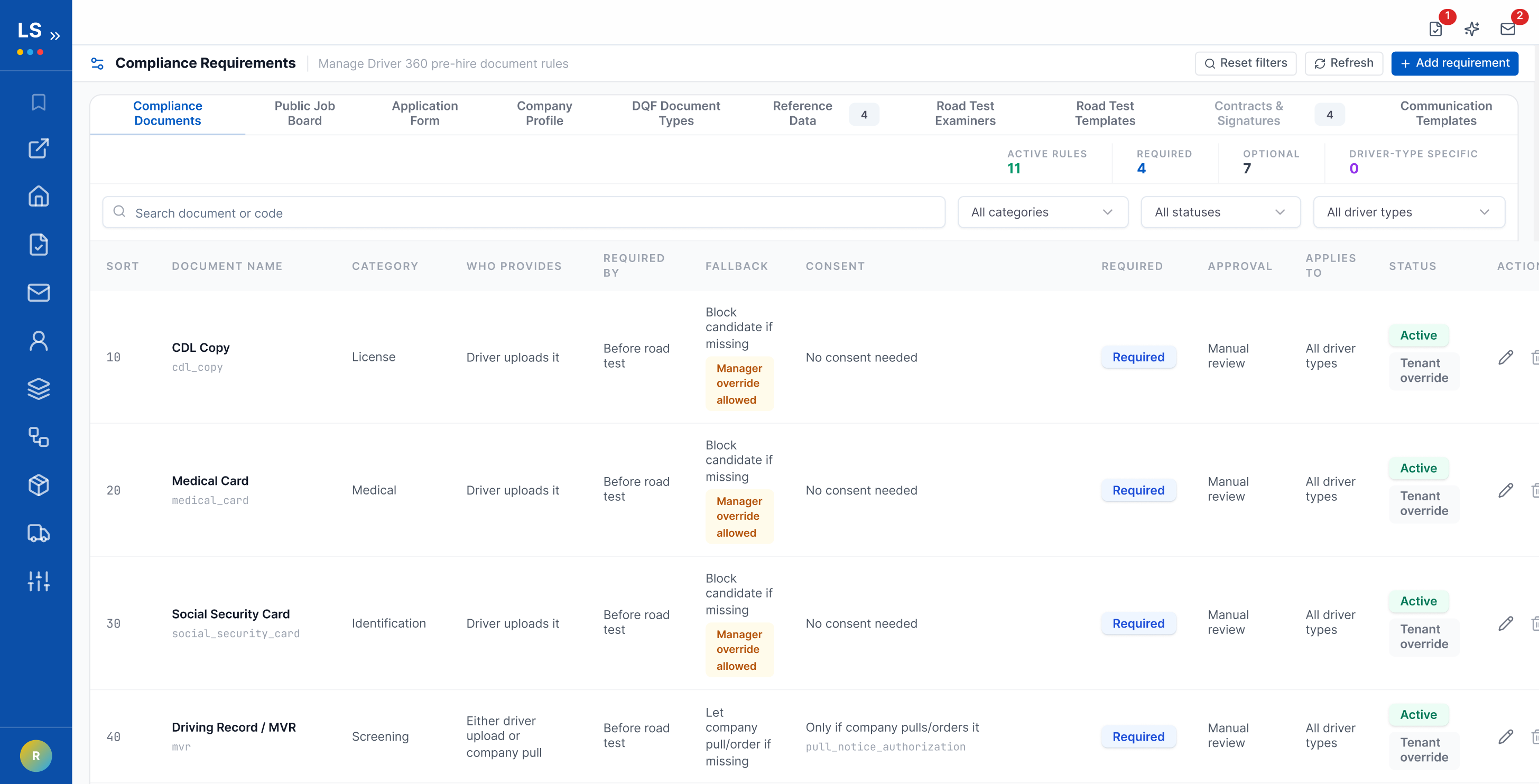
The application a candidate fills out, and the documents Driver 360 asks for, are not fixed. A carrier sets its own lookback years for residency, license history, accidents, and convictions, and decides whether each one is informational or strictly enforced. Identity and legal consent fields stay required no matter what.
Document rules work the same way. For each required item, a carrier decides who provides it: driver upload, a company-ordered pull, or either. It also decides when the item is due: at application, before the road test, or before the file converts to a hire. A missing file can hard-block a candidate, or a manager can override it, depending on how the carrier set the rule. None of this requires a support ticket or a code change. It's a settings screen.
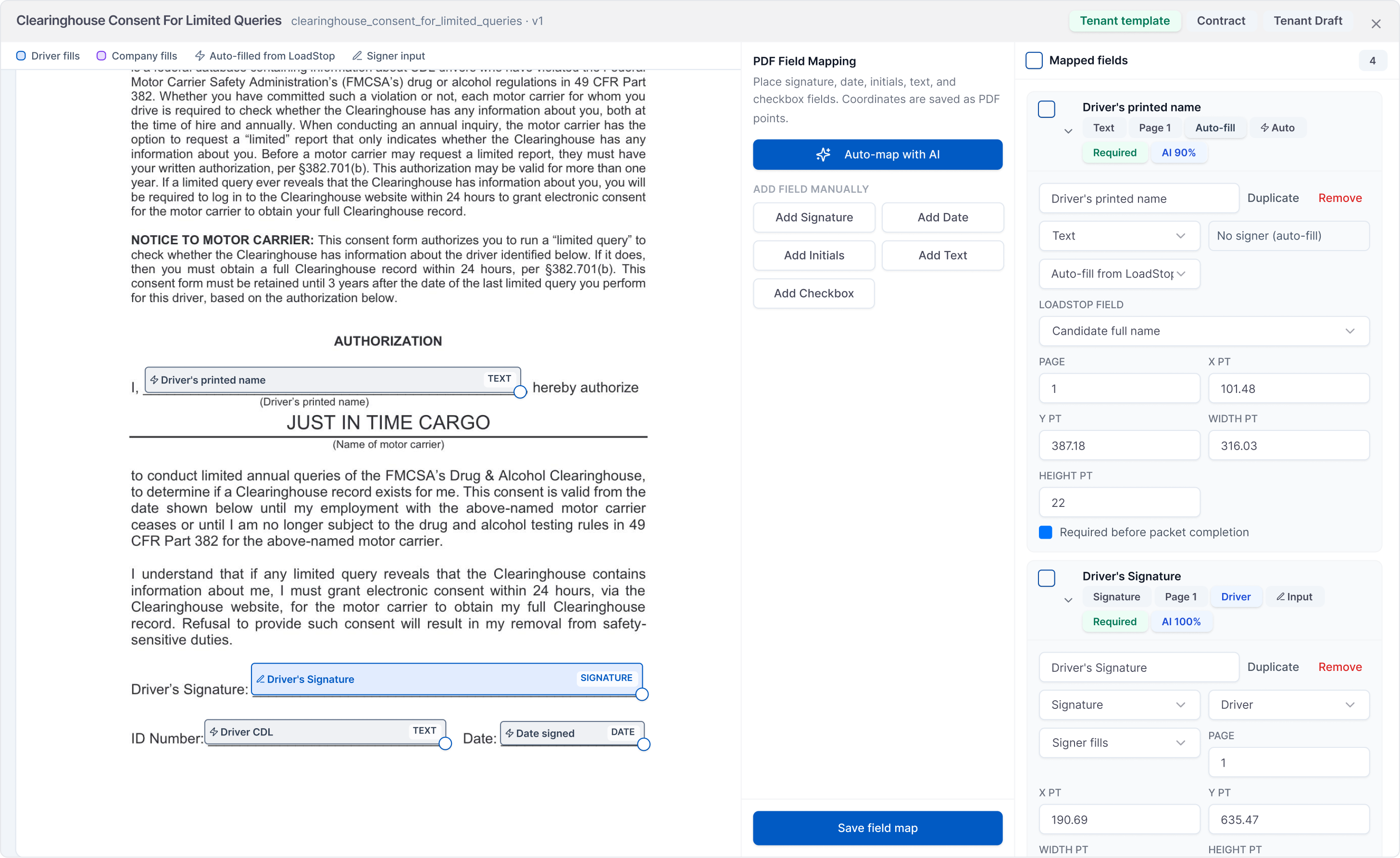
Signing Without a Second Tool
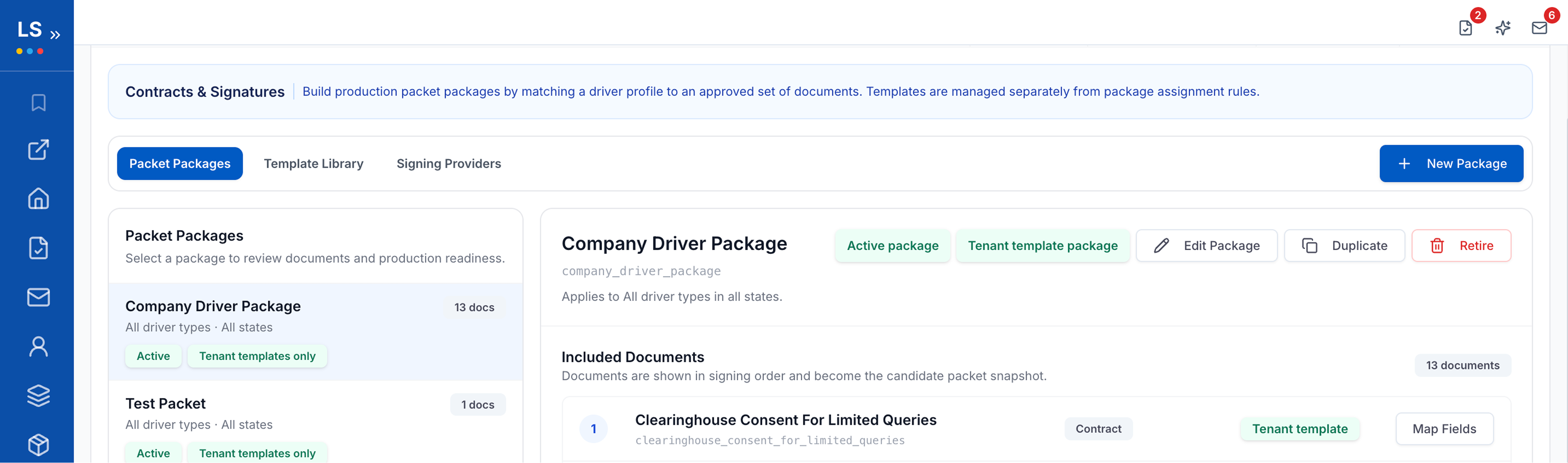
The contracts and consents a new driver signs never leave LoadStop for a third-party e-signature product. Signing happens through a guided, step-through modal: next field, then the next, typed or drawn signature, one flow per document. Every signature carries an ESIGN-compliant consent record, a timestamp, and the signer's IP address. The finished PDF then gets a digital seal, so it can't be quietly edited afterward. A recruiter can copy the signing link, add an internal signer, or void and reopen a packet. If a driver signs on paper instead, a manually uploaded copy still counts. No envelope fee. Because there's no envelope.
Closing the Loop with Prior Employers
Federal rules require checking a driver's employment history. It's also the step most likely to stall: chasing a prior safety manager who's changed jobs or stopped answering email. Driver 360 keeps it inside the candidate record instead of a separate outreach process. Prior employers are pulled straight from the DOT application, with phone, email, and fax already filled in and editable if a detail is wrong. One button emails the request, attaches the driver's signed release if one exists, and logs the send as an attempt. Each employer's status locks once it's completed, waived, or marked unable to verify, so nothing quietly falls off the list.
Driver 360: From Application to Activation
This isn't a hypothetical workflow. It's the same six stages Gabriel's team walked through, from the first job posting to the first driver activated inside LoadStop.
Driver 360: From Application to Activation
Six stages, one continuous record, from job posting to dispatch-ready driver.
| Stage | What happens |
|---|---|
| 1. Configure Positions | Set pay, route, equipment type, and required documents once per position. |
| 2. Post to Board | One posting goes live everywhere it's shared: a link, a QR code, a text, a flyer. |
| 3. Apply From Device | A driver applies from a phone and snaps a photo of his CDL to fill the fields. |
| 4. Review Flags the Gaps | Missing documents and inconsistencies get flagged before a recruiter opens the file. |
| 5. Score the Road Test | FMCSR-scored on a tablet, with the certificate filed the moment it ends. |
| 6. Activate the Driver | One click creates the driver record and syncs it into the TMS. |
This isn't a hypothetical workflow. It's the same six stages Gabriel's team walked through, from the first job posting to the first driver activated inside LoadStop.
Before a candidate reaches the Onboard tab, Driver 360 checks readiness on three fronts. Required screening tasks. Employment verification. DQF required items. Each one has to read Ready before onboarding is a one-step action instead of a manual chase. That's the difference between a candidate who looks ready on paper and a driver who's actually cleared to be dispatched.
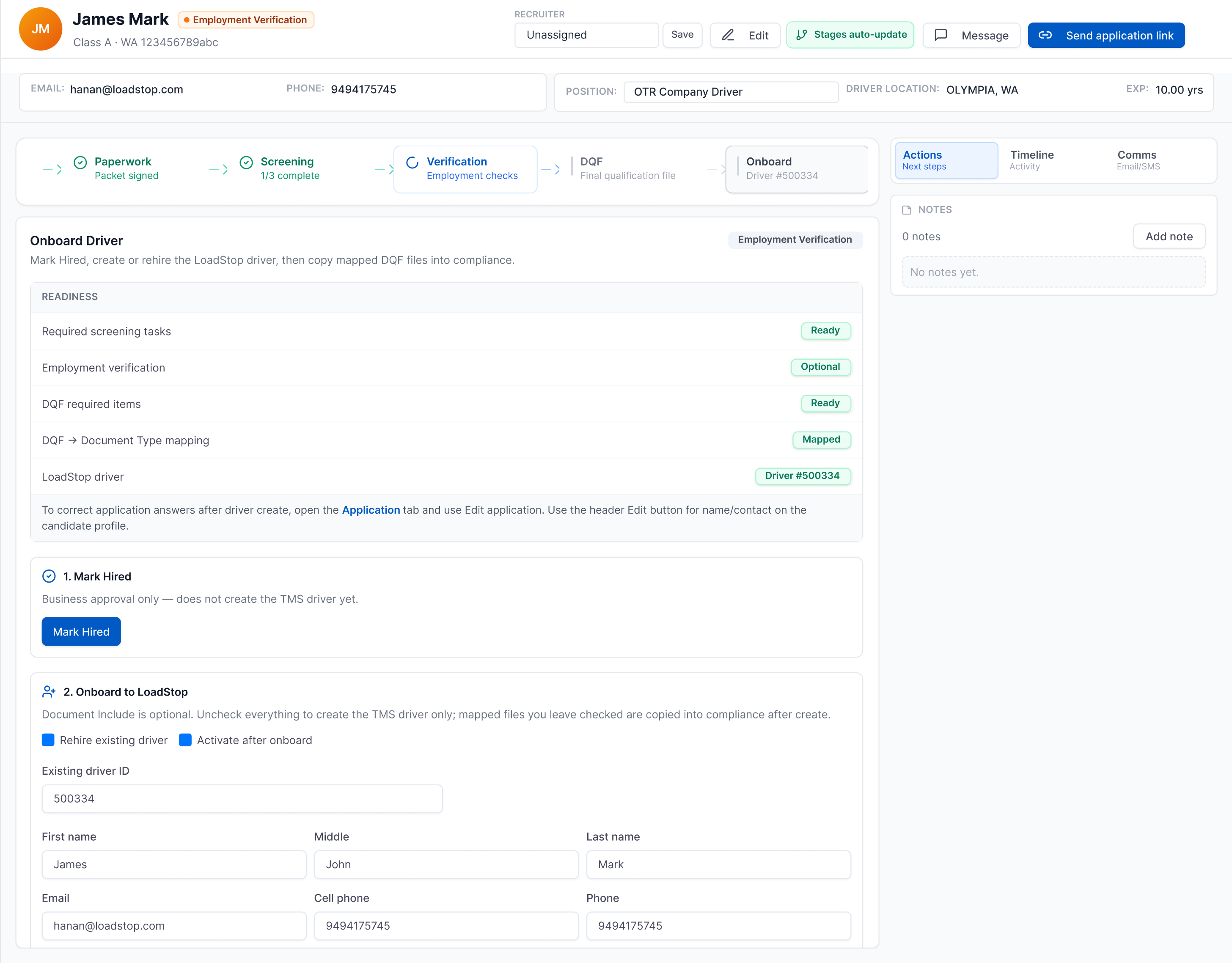
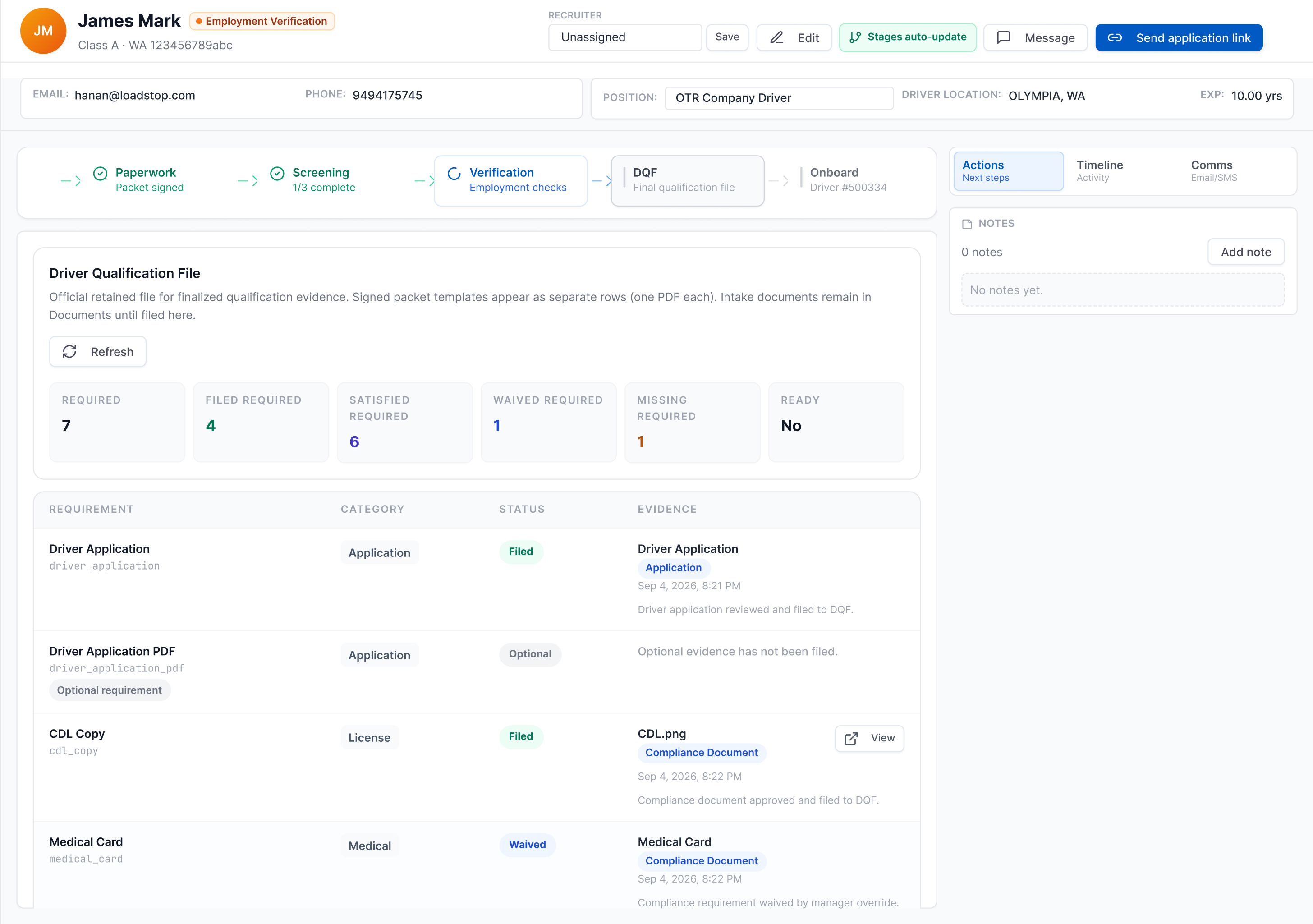
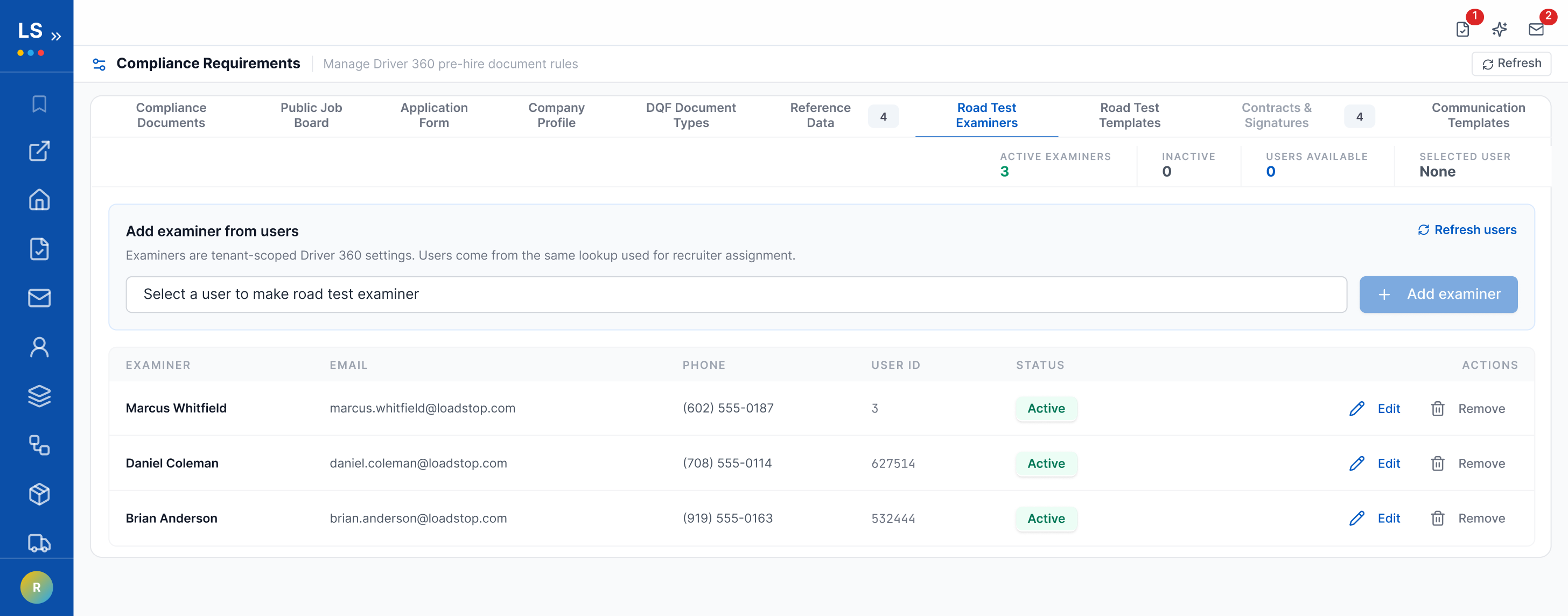
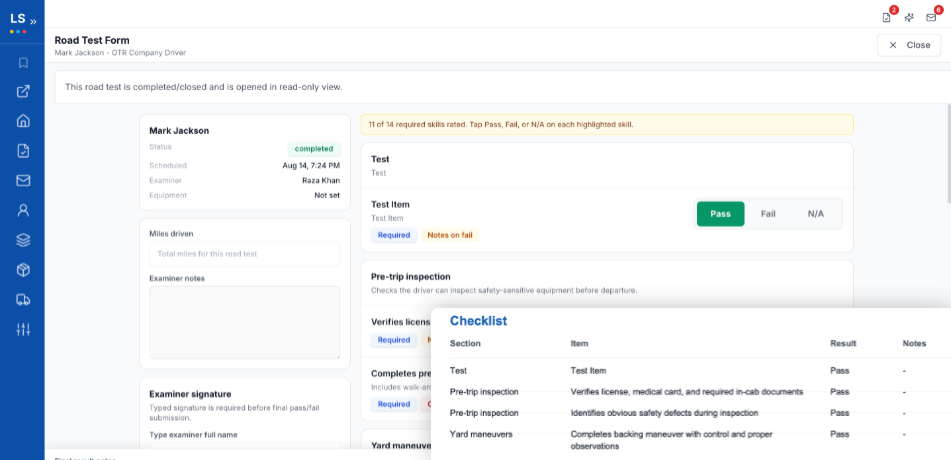
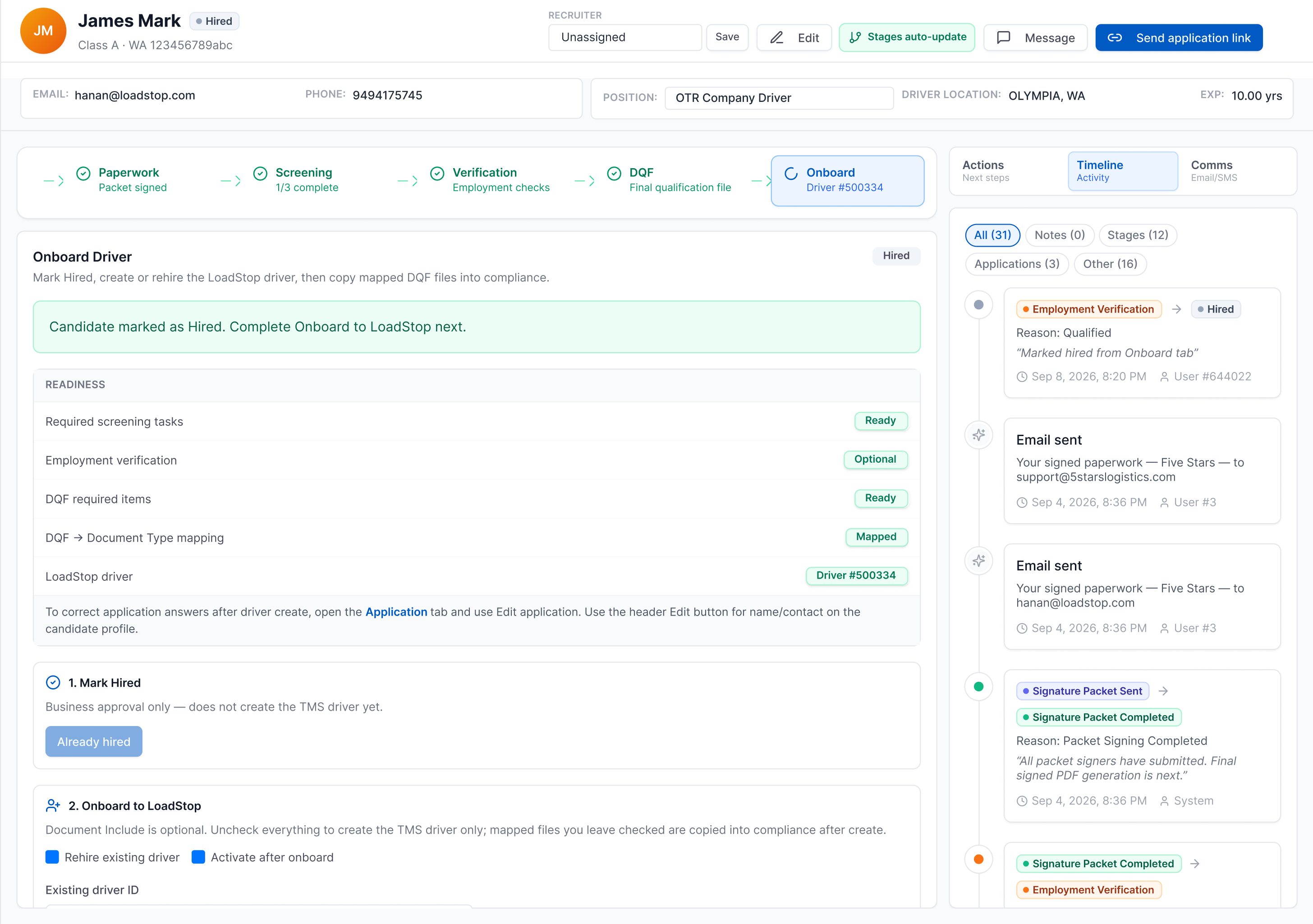
That single click does more than create a record. It creates the driver inside LoadStop TMS and copies the mapped CDL, medical, MVR, and signed paperwork straight into TMS Compliance. Nobody has to open a second screen and re-upload what the candidate already provided.
That same discipline continues after activation. LoadStop's compliance and safety tools keep tracking CDL, medical card, and MVR renewals for as long as he's on the roster.
The goal isn't to add another piece of software to a carrier's technology stack. The goal is to remove one.
Early results from the rollout: the path from application to dispatchable driver has run 5 to 7 days for carriers using Driver 360. Manual processes take 2 to 4 weeks for the same thing. Creating a driver across three separate systems by hand means retyping the same license number, CDL details, and terminal assignment three times. That usually takes 15 to 20 minutes, and it invites the kind of typo that shows up in one system but not another. Driver 360 replaces that with one click.
5–7 days
application to dispatchable, down from 2–4 weeks
10–40 hrs
admin time saved monthly, for fleets hiring 5–10 drivers/mo
1 click
replaces 15–20 minutes of 3-system re-entry
Why This Isn't Just One Customer's Story
What we like most about this story is that Driver 360 didn't start in a conference room with us asking: "What feature should we build next?" It started with a customer saying: "There has to be a better way to do this." Gabriel and the JITC team showed us the operational friction. Our team took that problem and built a solution around the way carriers actually recruit, qualify and onboard drivers.
And in the process, we realized this wasn't only JITC's problem. A lot of carriers are still managing driver recruiting, onboarding, compliance, documents and their TMS across multiple disconnected systems. We think there is a better way. If any of this sounds like your own hiring process, the questions below cover the ones we hear most, and there's a related look at what happens after hiring, once a driver's actually on the road, linked at the end of this post.
If your carrier is still using multiple platforms to take a driver from applicant to road-ready, we'd love to show you what we built. Reach out to the LoadStop team and ask us about Driver 360. Sometimes the best products don't start with an idea. They start with a customer problem worth solving.
Hire Drivers Inside Your TMS with LoadStop Driver 360
Bring driver hiring into your freight operation, from application to activation, without a second system in the middle.
Schedule a Demo